One thing is missing from SAP’s page for the WalkMe Digital Adoption Consultant certification, and it is the thing many people search for first: a price. What the page does show is the shape of the exam. C_WME is one Scenario-Based Assessment activity with a 65 percent pass score and a 2 hour duration, and it asks you to turn a business problem into WalkMe content, such as SmartTips, Smart Walk-Thrus, Launchers and ShoutOuts, aimed at the right users and backed by analytics.
This guide covers what the WalkMe Digital Adoption Consultant credential certifies, how the scenario is delivered and scored, what can honestly be said about cost, the seven blueprint areas on the ERPPrep study guide, the build decisions that trip candidates (conditions, segmentation and Smart Walk-Thru flow steps), how WalkMe relates to SAP Signavio and SAP LeanIX, and how to prepare.
Table of Contents
- What does the WalkMe Digital Adoption Consultant certification prove?
- How is C_WME delivered and scored?
- What does the WalkMe certification cost?
- Which seven blueprint areas does C_WME cover?
- What does Data, Action, Experience mean in a real build?
- How do the Condition Builder and segments decide who sees what?
- SmartTip or Smart Walk-Thru: which fits the task?
- Which engagement element fits which moment?
- How do you publish, test and measure a build?
- Where does WalkMe sit beside SAP Signavio and SAP LeanIX?
- How should you prepare for the C_WME scenario?
- Frequently Asked Questions
- Conclusion
What does the WalkMe Digital Adoption Consultant certification prove?
C_WME is the exam for SAP Certified – WalkMe Digital Adoption Consultant, an Associate level credential. It shows that the holder understands digital adoption and the WalkMe platform and can build WalkMe content that addresses a business challenge. SAP’s page describes a foundational understanding of digital adoption together with a comprehensive grasp of how to build solutions using WalkMe.
WalkMe is a digital adoption platform: a layer that sits on top of other applications and guides people through them while they work, without changing the underlying software. SAP completed its acquisition of WalkMe in 2024, and the credential now sits in SAP’s certification catalogue next to its other transformation products. The ERPPrep study guide lists the intended audience as digital adoption consultants, WalkMe architects and data analysts, along with administrators, project managers and business users stepping into a WalkMe implementation role.
What SAP’s card shows
SAP displays three role tags for C_WME, namely Consultant, Architect and Data Analyst, and four skills: Technology Solution Adoption, Data Storytelling, Product Adoption Strategies and Statistical Analysis. The mix tells you something useful. This is a builder’s exam that also expects you to read the numbers afterwards and say whether the build worked.
A note on other WalkMe credentials
Searches for a WalkMe builder or developer certificate often refer to training tracks that WalkMe has run through its own institute. This article is about the SAP credential, C_WME, which is the one listed on SAP’s certification site. Older notes also mention suffixed codes such as C_WME_2506 and C_WME_2601, while SAP’s page lists plain C_WME.
How is C_WME delivered and scored?
C_WME is a single Scenario-Based Assessment activity with a 65 percent pass score. You are given a realistic digital adoption situation and work out, and justify, the build that solves it. SAP’s card displays a 2 hour duration and says the available languages vary by assessment format.
| Field | Value |
|---|---|
| Exam code | C_WME |
| Credential | SAP Certified – WalkMe Digital Adoption Consultant |
| Level | Associate |
| Format | Scenario-Based Assessment (SBA), 1 activity |
| Passing score | 65 percent |
| Duration | 2 hours, as displayed by SAP; the ERPPrep pages publish no duration |
| Languages | Vary by format, as displayed by SAP: roleplay with AI guidance in English, Spanish, Italian, French, Japanese and more; recorded video in English only |
| Product | WalkMe |
| Blueprint areas | 7, with no published weightings |
Treat 65 percent as a floor
The ERPPrep FAQ makes the point that in a single connected activity the cut score reflects how completely and correctly you carry out the required build, so partial or inconsistent work across linked steps can pull a result under the line quickly. Aim to finish every part cleanly instead of counting on the margin.
Two formats, two language lists
SAP lists two ways of taking a scenario-based assessment. In a roleplay with AI guidance you talk through the situation, with a long list of languages on offer. In the recorded video format you present your answer on camera, in English only. SAP also offers an AI-powered scenario tool for a trial run, and a Technical Readiness Checklist for the computer you will use.
What does the WalkMe certification cost?
SAP’s certification page for C_WME does not display a price. It states that you need a Learning Hub subscription that includes SAP Certification exam attempts and an SAP Universal ID with a secondary email address. The cost therefore depends on the subscription you or your employer hold, and the current figure has to be checked with SAP directly.
How attempts work
According to SAP’s page, the exam page shows your available attempts, with subscription attempts and exam attempts listed separately, and each exam attempt counts as one attempt from your subscription. The practical consequence is that a failed attempt uses up something you paid for, which is a good reason to rehearse the scenario format before the real one.
Taking it from where you are
Search data shows many people asking about this certification from specific countries. SAP’s page lists no country-specific versions of C_WME. The assessment is taken on your own computer after the readiness check, so the questions to settle locally are whether the subscription is sold in your country and which language format suits you.
Figures quoted on third-party sites for the fee or the validity period are not shown on SAP’s certification page for this exam, so they are not repeated here.
Which seven blueprint areas does C_WME cover?
The ERPPrep study guide lists seven blueprint areas for C_WME, with no weightings published. They move from the idea of digital adoption, through the WalkMe environment and its targeting logic, to the content types you build, and finish with segmentation, publishing, quality assurance, advanced configuration and analytics.
| Blueprint area | What it asks of you |
|---|---|
| Digital Adoption & WalkMe Fundamentals | Define digital adoption and digital transformation, explain WalkMe’s value and use cases, apply the Data.Action.Experience methodology |
| WalkMe Environment, Apps & Build Strategy | Set up the essential tools and a unique user identifier, navigate the Editor and its apps, plan a build around real use cases |
| Condition Builder & Targeting Logic | Write efficient conditions that control when and to whom content appears |
| SmartTips & Smart Walk-Thrus | Build and customise both, including start points, goals and flow steps with splits, wait-for conditions and automation |
| Engagement Elements & Onboarding | Configure Resources, Shuttles, Launchers, ShoutOuts, onboarding tasks and the menu users open for help |
| Segmentation, Publishing & Quality Assurance | Create segments, preview and publish builds, run tests and troubleshoot before and after go-live |
| Advanced Configuration & WalkMe Analytics | Handle integrations, single-page applications, multi-language content, jQuery selectors, dynamic ShoutOuts and surveys, and use engagement analytics and tracked events |
The ERPPrep FAQ names Smart Walk-Thru flow logic, condition building and segmentation as the areas candidates find trickiest, with analytics interpretation and multi-language configuration close behind. ERPPrep’s free WalkMe skill drills start one step earlier, with consultant situations such as how to frame a first adoption goal or which measure shows that a programme is really achieving adoption.
What does Data, Action, Experience mean in a real build?
Data.Action.Experience is the success methodology named in the C_WME blueprint. It means gathering data about how people use an application, turning that data into a decision about what to fix, and shaping the user’s experience with content that fixes it. Every build in the exam is expected to follow that order.
Data first
Going live with a new system is not the same as adoption. People can have access to software and still avoid it, misuse it or raise a support ticket for every step. The first move is to find out where that happens: which forms are abandoned, which fields are filled in wrongly, which processes are started and never finished.
Then action and experience
With the friction located, you choose a response and build it, for example a validation hint on a field people get wrong, or a guided flow through a process they rarely perform. Then you measure again. Guidance is not a one-off deliverable handed over at go-live. It is maintained as the application and the users change.
“At SRP, we have monthly releases, so unless it’s a critical update or fix, getting a change is usually going to take a few weeks. But with WalkMe, I can build and deploy content in 15 to 30 minutes.”
That speed is the reason the methodology matters. When a fix can be published in minutes, the discipline has to come from deciding what is worth fixing, and that decision comes from data.
How do the Condition Builder and segments decide who sees what?
The Condition Builder is where you write the rules that control when a piece of WalkMe content appears and to whom. Segments group users so that content reaches the right audience. The study guide calls conditions the decision layer under SmartTips, Smart Walk-Thrus, segmentation and the other elements, which is why an error here spreads through a whole build.
What a condition can test
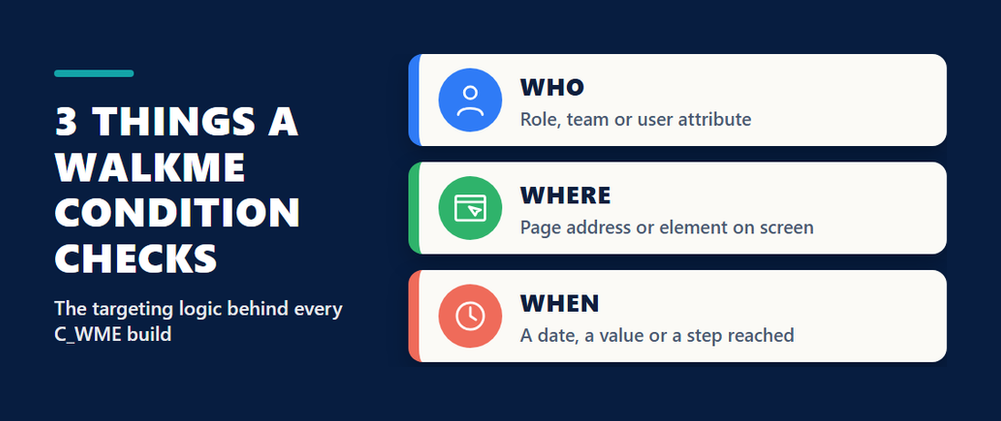
A condition can look at where the user is, such as the page address or whether a particular element is on screen, at who the user is, such as a role or another attribute supplied by the application, and at the state of things, such as a date or a value in a field. Conditions can be combined, and the blueprint asks for efficient ones: a rule that checks one stable thing is easier to maintain and quicker to evaluate than a chain of fragile checks.
Why the unique user identifier comes first
The environment area of the blueprint includes setting up a unique user identifier. Without a reliable way to recognise each user, WalkMe cannot remember that someone has finished an onboarding task, cannot report on individuals or groups properly and cannot segment by user attributes. It is an early setting that later features depend on, which is exactly the kind of dependency a scenario likes to probe.
Segments and conditions as one skill
The study guide advises treating segmentation and the Condition Builder as a combined skill. A segment is defined by conditions, and content assigned to it inherits them. If managers are seeing guidance meant for new starters, the question is not which content item is broken. It is which rule placed those managers in the segment.
SmartTip or Smart Walk-Thru: which fits the task?
Use a SmartTip when the user needs help with a single field or control, and a Smart Walk-Thru when the user needs to be led through a task that spans several steps or screens. Both are in the same blueprint area, and choosing the lighter option that solves the problem is part of what the scenario assesses.
| Question | SmartTip | Smart Walk-Thru |
|---|---|---|
| What it is | A hint or a validation message attached to one element | A guided sequence of steps through a process |
| Best for | Fields people fill in wrongly or do not understand | Tasks people perform rarely or abandon partway |
| How it starts | It is present on the element when its conditions are met | From a start point, a Launcher, the menu or automatically |
| What to design | The wording and, for validation, the rule | Start points, goals and flow steps |
Flow steps: splits, wait-for and automation
A Smart Walk-Thru is more than a list of balloons. A split sends users down different paths depending on a condition, for example whether an optional section applies to them. A wait-for step pauses the flow until something happens on the page. An automated step performs an action for the user, such as a click or filling a value. The ERPPrep FAQ lists this flow logic first among the difficult topics, because each choice changes the path a user experiences.
Start points and goals
Start points let a flow begin from wherever the user already is, so someone halfway through a process is not sent back to the first screen. Goals define what success means for the flow, which is what later lets analytics report completion instead of mere views.
Which engagement element fits which moment?
The engagement area of the blueprint covers the items that bring guidance to users at the right moment: Launchers, ShoutOuts, Resources, Shuttles, onboarding tasks and the menu that collects them. Each answers a different need, and the scenario expects you to match the element to the audience and the moment.
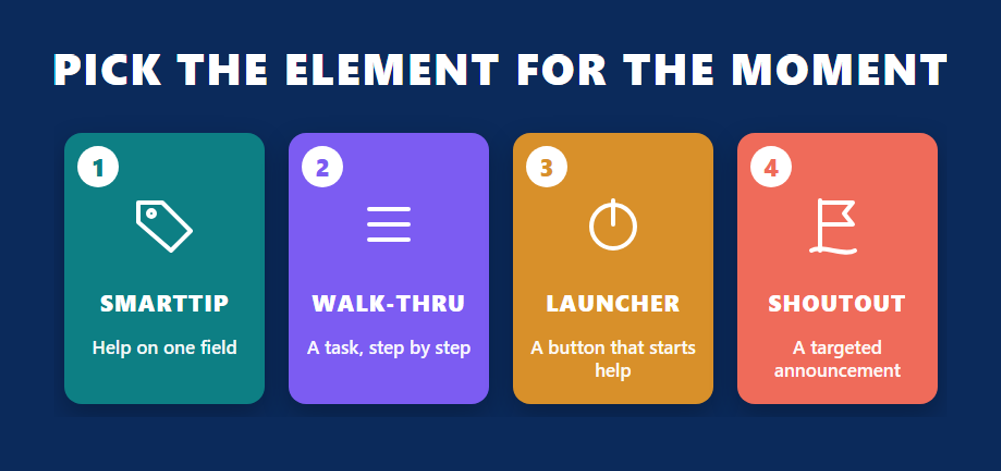
| Element | What it does | Use it when |
|---|---|---|
| Launcher | A button placed on a page that starts a flow or opens help | Help should be available at the exact place a task begins |
| ShoutOut | An announcement shown to the user, usually with an action | People must know about a change, a deadline or a new feature |
| Resource | A link to supporting material such as an article or a video | The user needs reference content, not step by step guidance |
| Shuttle | A shortcut that takes the user to a page | The hard part is finding where to go |
| Onboarding task | An item on a checklist the user completes over time | New users need a set of first activities tracked to completion |
Do not shout about everything
A common design error is to announce every piece of guidance with a pop-up. People learn to close them. A ShoutOut suits a real announcement to a defined segment, and a Launcher or a SmartTip suits help that should simply be present when needed. In the customer example quoted above, in-app reminders about key dates worked because they were targeted and offered an immediate action.
How do you publish, test and measure a build?
The publish-and-measure loop in C_WME has four parts: preview the content, run quality-assurance tests, publish, and then read the engagement analytics. The study guide asks you to be able to follow a build from creation through to its data, and to troubleshoot problems both before and after it goes live.
Quality assurance
Testing means playing the content as each relevant segment would see it, on the pages and browsers users really have, and checking that every condition behaves as written. Most faults found at this stage are targeting faults: an element that cannot be found on the page, or a rule that is true for the wrong people.
Advanced configuration
The final blueprint area gathers the topics that make builds robust. Single-page applications change content without loading a new page, so rules that rely on page loads need care. Multi-language content lets one build serve users in several languages. Where WalkMe’s automatic element recognition is not enough, a jQuery selector can identify an element precisely. Selectors follow the same ideas as CSS, described in the W3C’s Selectors specification, and the jQuery project documents its own jQuery selector reference.
Analytics and tracked events
Engagement analytics show how often content is played, completed or abandoned, and tracked events record actions in the application that you choose to follow. Together they answer the only question that matters at the end of a build: did the behaviour change? A flow with many plays and few goal completions has told you where to look next.
How should you prepare for the C_WME scenario?
Prepare for C_WME by building in the WalkMe Editor and by practising how you would explain each build. The ERPPrep FAQ puts the learning journey at roughly 22 hours across three courses and suggests several weeks to a couple of months of preparation, most of it hands-on.
- Spend the majority of your preparation inside the WalkMe Editor, building real SmartTips, Smart Walk-Thrus and segments yourself.
- Learn Smart Walk-Thru flow steps thoroughly, covering splits, wait-for conditions and automation, and practise how each choice changes the path a user experiences.
- Treat segmentation and the Condition Builder as a combined skill, because the conditions you define decide which users see which content.
- Rehearse the full publish-and-measure loop by preparing content, running quality-assurance checks, publishing and then reviewing engagement analytics.
- Practise reading a business requirement and mapping it to concrete WalkMe steps before configuring anything, so the scenario is interpreted correctly from the start.
The three courses
SAP’s WalkMe learning journey maps to the exam. The ERPPrep study guide lists three courses in rising order of difficulty: WME001 Starting your Digital Adoption Journey: WalkMe Fundamentals, WME002 Getting Started with Building WalkMe Solutions, and WME003 Advancing your Skills in Building WalkMe Solutions. The FAQ recommends taking them in that order.
Before you book
Open SAP’s C_WME certification page to confirm the format, the pass score and your available attempts. ERPQnA’s earlier WalkMe consultant preparation guide lists the topic areas from before the move to Scenario-Based Assessments, so read its format details as history.
Frequently Asked Questions
What is the exam code for the WalkMe Digital Adoption Consultant certification?
The exam code is C_WME, for SAP Certified – WalkMe Digital Adoption Consultant. SAP’s certification page lists the code without a suffix, although older notes mention C_WME_2506 and C_WME_2601.
What is the passing score for C_WME?
The passing score is 65 percent, on a single Scenario-Based Assessment activity.
How long is the C_WME exam?
SAP’s certification page displays a duration of 2 hours. The ERPPrep pages do not publish a duration, so SAP’s page is the source for that figure.
How much does the WalkMe certification cost?
SAP’s certification page for C_WME does not display a price. It says you need a Learning Hub subscription that includes SAP Certification exam attempts, so the cost depends on that subscription and should be checked with SAP.
Which languages is C_WME offered in?
SAP’s page says available languages vary by format. It lists English, Spanish, Italian, French, Japanese and more for the roleplay with AI guidance, and English only for the recorded video format.
Can I take C_WME from any country?
SAP’s page lists no country-specific versions of the exam. It is taken on your own computer after a technical readiness check, so confirm locally that the required subscription is available to you.
Which C_WME topics are hardest?
The ERPPrep FAQ names Smart Walk-Thru flow logic, condition building and segmentation, followed by analytics interpretation and multi-language configuration.
What is the difference between a SmartTip and a Smart Walk-Thru?
A SmartTip is a hint or validation message attached to a single element. A Smart Walk-Thru is a guided sequence of steps that leads a user through a whole task.
Do I need coding skills for C_WME?
Most of the blueprint is built without code in the WalkMe Editor. The advanced area does include jQuery selectors, so being able to read and write a simple selector is useful.
Conclusion
The WalkMe Digital Adoption Consultant exam checks whether you can go from a business problem to working, well-aimed guidance and then show that it helped. C_WME is one Scenario-Based Assessment activity, 2 hours by SAP’s display, passed at 65 percent, across seven blueprint areas, and SAP’s page shows no price because attempts come through a Learning Hub subscription. The marks are won and lost in the connections: a unique user identifier set up early, conditions that put the right people in each segment, flow steps that follow the user’s real path, and analytics read against a goal. Take WME001, WME002 and WME003 in order, build far more than you read, and book once you can explain why each element in your build exists.


