What is PAL in SAP?
In SAP, PAL stands for Predictive Analysis Library.
It’s a collection of built-in, pre-delivered machine learning and statistical algorithms that run directly inside SAP HANA (in-memory database). Instead of exporting data to an external ML tool (like Python, R, etc.), PAL allows you to do predictive analytics inside HANA itself, close to the data.
Key Capabilities
- In-Database Predictive Processing: PAL enables running ML/statistical algorithms within the HANA database itself, eliminating the need to export data to external tools. This delivers high performance and reduces data latency.
- Rich Algorithm Portfolio: PAL provides a wide spectrum of built-in algorithms: classification (decision trees, logistic regression, Naïve Bayes), regression (linear, polynomial), clustering (k-means, DBSCAN), time-series forecasting (ARIMA, exponential smoothing), association rules, anomaly detection, and more.
- SQL/Script-Based Invocation: All PAL algorithms are exposed as SQL Script procedures. Developers can embed calls directly in SQL or stored procedures, enabling seamless integration with existing database logic without switching environments.
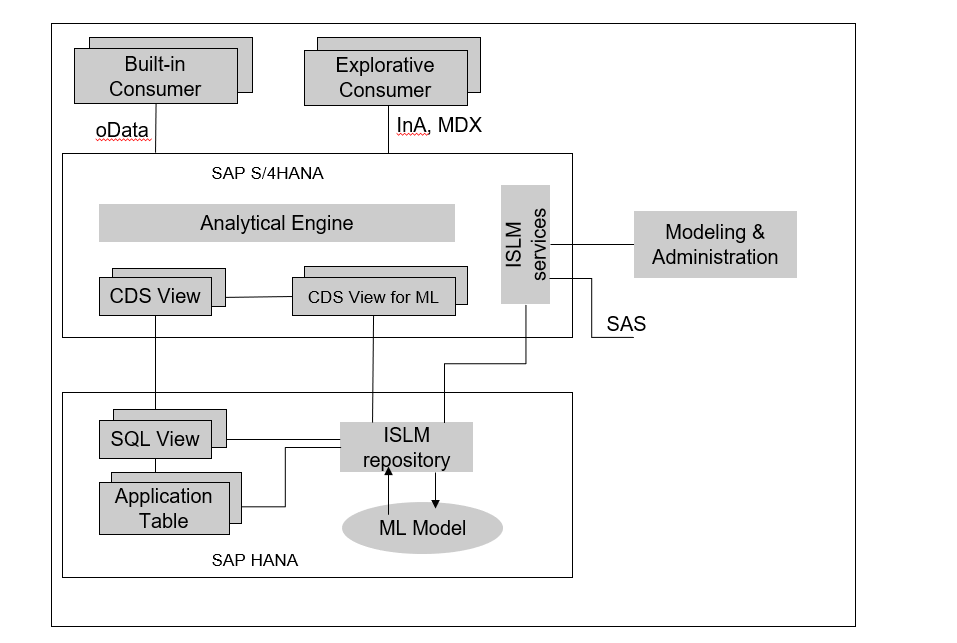
SAP HANA’s SQL Script is an extension of SQL. It includes enhanced control-flow capabilities and lets developers define complex application logic inside database procedures. However, it is difficult to describe predictive analysis logic with procedures.
Why PAL was introduced
For example, an application may need to perform a cluster analysis in a huge customer table with 1T records. It is impossible to implement the analysis in a procedure using the simple classic K-means algorithms, or with more complicated algorithms in the data-mining area. Transferring large tables to the application server to perform the K-means calculation is also costly.
Prerequisites
- ADT (ABAP Development Toolkit)
- ABAP GUI Logon with system access
Segmentation Analysis
- Open ABAP Perspective:
Window → Perspective → Open Perspective → ABAP
- Create an ABAP Project:
Use the left panel → Create ABAP Project → connect to your SAP system
- Define AMDP Procedures:
Create AMDP procedures to define input/output structures for the PAL algorithm
Create an ABAP Report:
- Fetch the required data
- Set algorithm parameters
- Call the AMDP procedure to run the PAL algorithm
- Display or store the results
Predefined PAL Algorithms Available in SAP HANA
The Predictive Analysis Library (PAL) defines functions that can be called from within SQL Script procedures to perform analytic algorithms. This release of PAL includes classic and universal predictive analysis algorithms in ten data-mining categories:
Clustering
- Classification
- Regression
- Association
- Time Series
- Preprocessing
- Statistics
- Social Network Analysis
- Recommender System
- Miscellaneous
Checking PAL Installation
To confirm that the PAL procedures were installed successfully, you can check the following three public views:
- sys.afl.areas
- sys.afl_packages
- sys.afl_functions
These views are granted to the PUBLIC role and can be accessed by anyone.
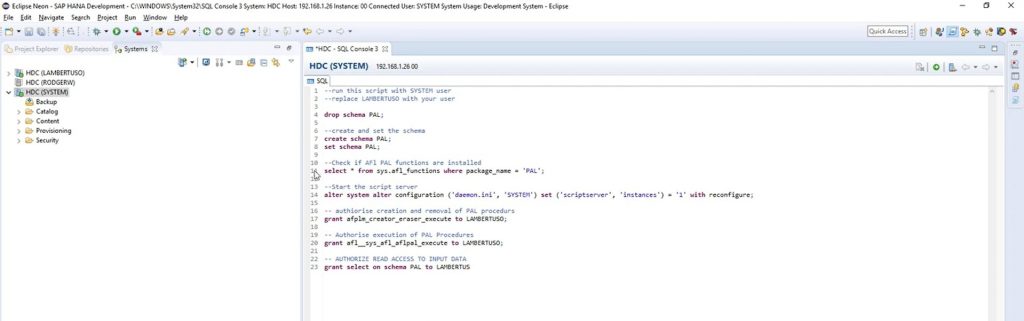
To check the views, run the following SQL statements:
SELECT * FROM "SYS"."AFL_AREAS" WHERE AREA_NAME = 'AFLPAL';
SELECT * FROM "SYS"."AFL_PACKAGES" WHERE AREA_NAME = 'AFLPAL';
SELECT * FROM "SYS"."AFL_FUNCTIONS" WHERE AREA_NAME = 'AFLPAL';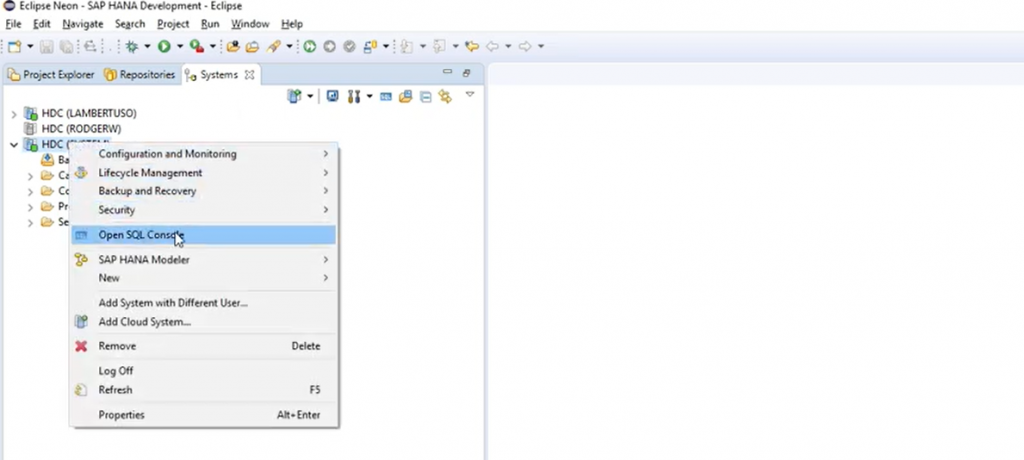
Example for Classification Algorithm
AMDP class: It acts as a bridge between ABAP and SAP HANA PAL. It allows us to define the input and output structures and call the PAL algorithms directly from ABAP, enabling in-database predictive analytics without moving data outside HANA.
CLASS cl_demo DEFINITION
  PUBLIC
  FINAL
  CREATE PUBLIC .

  PUBLIC SECTION.
    INTERFACES : if_amdp_marker_hdb.

    TYPES : BEGIN OF ty_input,
              From_node TYPE c LENGTH 30,
              To_node   TYPE c LENGTH 30,
            END OF ty_input,

            tt_input TYPE STANDARD TABLE OF ty_input WITH EMPTY KEY,

            BEGIN OF ty_param,
              name       TYPE c LENGTH 60,
              intargs    TYPE i,
              doubleargs TYPE f,
              stringargs TYPE c LENGTH 100,
            END OF ty_param,

            tt_param TYPE STANDARD TABLE OF ty_param WITH EMPTY KEY,

            BEGIN OF ty_result,
              node TYPE c LENGTH 30,
              rank TYPE f,
            END OF ty_result,

            tt_result TYPE STANDARD TABLE OF ty_result WITH EMPTY KEY,

            BEGIN OF ty_user_count,
              role_name  TYPE string,
              user_count TYPE i,
            END OF ty_user_count,

            tt_user_count TYPE STANDARD TABLE OF ty_user_count WITH EMPTY KEY,

            BEGIN OF ty_scaling_input,
              data_id    TYPE i,
              count TYPE i,
              rank TYPE f,
            END OF ty_scaling_input,

            tt_scaling_input TYPE STANDARD TABLE OF ty_scaling_input WITH EMPTY KEY,

            BEGIN OF ty_scaling_param,
              name       TYPE c LENGTH 30,
              intargs    TYPE i,
              doubleargs TYPE f,
              stringargs TYPE c LENGTH 30,
            END OF ty_scaling_param,

            tt_scaling_param TYPE STANDARD TABLE OF ty_scaling_param WITH EMPTY KEY,

            BEGIN OF ty_res,
              data_id    TYPE i,
              count TYPE i,
              rank TYPE f,
            END OF ty_res,

            tt_res TYPE STANDARD TABLE OF ty_res WITH EMPTY KEY,

            BEGIN OF ty_model,
              id            TYPE i,
              model_content TYPE c LENGTH 5000,
            END OF ty_model,

            tt_model TYPE STANDARD TABLE OF ty_model WITH EMPTY KEY,

            BEGIN OF ty_statistics,
              stat_name  TYPE c LENGTH 256,
              stat_value TYPE c LENGTH 1000,
            END OF ty_statistics,

            tt_statistics TYPE STANDARD TABLE OF ty_statistics WITH EMPTY KEY,

            BEGIN OF ty_placeholder,
              param_name   TYPE c LENGTH 256,
              int_value    TYPE i,
              double_value TYPE f,
              string_value TYPE c LENGTH 1000,
            END OF ty_placeholder,

            tt_placeholder TYPE STANDARD TABLE OF ty_placeholder WITH EMPTY KEY.


    METHODS : run_pagerank
      IMPORTING
        VALUE(it_data)   TYPE tt_input
        VALUE(it_param)  TYPE tt_param OPTIONAL
      EXPORTING
        VALUE(it_result) TYPE tt_result,

      run_scaling
        IMPORTING
                  VALUE(it_input)       TYPE tt_scaling_input
                  VALUE(it_param)       TYPE tt_scaling_param OPTIONAL
        EXPORTING
                  VALUE(it_res)         TYPE tt_res
                  VALUE(it_model)       TYPE tt_model
                  VALUE(it_statistics)  TYPE tt_statistics
                  VALUE(it_placeholder) TYPE tt_placeholder
        RAISING   cx_amdp_error.

ENDCLASS.

CLASS cl_demo IMPLEMENTATION.

  METHOD run_pagerank BY DATABASE
   PROCEDURE FOR HDB
   LANGUAGE SQLSCRIPT OPTIONS READ-ONLY.

    CALL _SYS_AFL.PAL_PAGERANK(:it_data, :it_param, :it_result);

  ENDMETHOD.


  METHOD run_scaling BY DATABASE
     PROCEDURE FOR HDB
     LANGUAGE SQLSCRIPT OPTIONS READ-ONLY.

    CALL _SYS_AFL.PAL_SCALE(:it_input, :it_param, :it_res, :it_model, :it_statistics, :it_placeholder );

  ENDMETHOD.
ENDCLASS.
To execute PAL algorithms in SAP HANA, we create an ABAP report program. This program calls the methods defined in the AMDP class, fetches the required data, sets the necessary algorithm parameters, runs the predictive procedures, and captures the results for analysis or further processing.
REPORT zpal_demo.

DATA: lt_input               TYPE cl_demo=>tt_input,
      ls_input               LIKE LINE OF lt_input,
      lr_table               TYPE REF TO cl_salv_table,
      lt_param               TYPE cl_demo=>tt_param,
      ls_param               LIKE LINE OF lt_param,
      lt_result              TYPE cl_demo=>tt_result,
      lt_scale_input         TYPE cl_demo=>tt_scaling_input,
      lt_scale_param         TYPE cl_demo=>tt_scaling_param,
      lt_scale_result        TYPE cl_demo=>tt_res,
      lt_scale_stcs          TYPE cl_demo=>tt_statistics,
      lt_scale_model         TYPE cl_demo=>tt_model,
      lt_scale_placeholder   TYPE cl_demo=>tt_placeholder,
      lr_pagerank            TYPE REF TO cl_demo,
      lr_scaling             TYPE REF TO cl_demo.

   START-OF-SELECTION.

  SELECT FROM (Data source)
        FIELDS * INTO TABLE (lt_final).

  "Run pagerank clustering
  CREATE OBJECT lr_pagerank.
  TRY.
      CALL METHOD lr_pagerank->run_pagerank
        EXPORTING
          it_data   = CONV #( lt_final )
          it_param  = lt_param
        IMPORTING
          it_result = lt_result.
    CATCH cx_amdp_version_mismatch INTO DATA(ls_error).
      CALL METHOD ls_error->get_text
        RECEIVING
          result = DATA(ls_txt).

  ENDTRY.

    "Parameters
  APPEND VALUE #( name = 'SCALING_METHOD' intargs = 0 doubleargs = 0 stringargs = '' ) TO lt_scale_param.
  APPEND VALUE #( name = 'Z-SCORE_METHOD' intargs = 0 doubleargs = 0 stringargs = '' ) TO lt_scale_param.
  APPEND VALUE #( name = 'NEW_MAX'        intargs = 0 doubleargs = '1.0' stringargs = '' ) TO lt_scale_param.
  APPEND VALUE #( name = 'NEW_MIN'        intargs = 0 doubleargs = '0.0' stringargs = '' ) TO lt_scale_param.
  APPEND VALUE #( name = 'DIVISION_BY_ZERO_HANDLER' intargs = 0 doubleargs = 0 stringargs = '' ) TO lt_scale_param.

  CREATE OBJECT lr_scaling.
  TRY.
      CALL METHOD lr_scaling->run_scaling
        EXPORTING
          it_input       = lt_scaling_input
          it_param       = lt_scale_param
        IMPORTING
          it_res         = lt_scale_result
          it_model       = lt_scale_model
          it_statistics  = lt_scale_stcs
          it_placeholder = lt_scale_placeholder.

    CATCH cx_amdp_error INTO DATA(ls_scale_error).
      CALL METHOD ls_scale_error->get_text
        RECEIVING
          result = DATA(ls_scale_txt).
      CALL METHOD ls_scale_error->get_longtext
        RECEIVING
          result = DATA(ls_long_txt).

ENDTRY.Note: While creating the parameter table, make sure to refer carefully to the official PAL documentation for the specific algorithm you are using. The structure and fields of the parameter table may differ based on the algorithm requirements, so modify it accordingly before execution.
The official PAL documentation will be attached at the end of this article for reference.
Example for including ISLM into Embeddings
*ISLM Connectivity
   DATA(lo_vector_api) =  cl_aic_islm_embed_api_factory=>get( )->create_instance( 'EMBEDDING' ).
Common error we face while working with PAL procedures:
Could not execute ‘CALL SYS.AFLLANG_WRAPPER_PROCEDURE_CREATE (‘area_name’, ‘function_name’, ‘schema_name’, …’ SAP DBTech JDBC: [259]: invalid table name: Could not find table/view SIGNATURE_TABLE in schema PA0001: line 2 col 34 (at pos 107).
How to Resolve this problem?.
The above-mentioned error usually occurs when the mandatory fields in the parameter table are missing or incorrectly defined.
Each PAL algorithm has its own official SAP documentation that specifies the required parameter fields and their data types. It’s important to refer to the respective document while creating the parameter table to avoid such errors.
Conclusion
SAP HANA PAL enables performing machine learning directly inside the HANA database, ensuring faster processing and real-time insights. With algorithms like clustering, classification, and regression, it helps build intelligent, data-driven applications seamlessly integrated within the SAP environment.


