SAP asks the consultant who implements Employee Central Payroll to hold two credentials, and C_HRHPC is the second of them. The first is C_HCMP, the HCM payroll exam; the second is SAP Certified – Implementation Consultant – SAP SuccessFactors Employee Central Payroll, exam code C_HRHPC, and SAP’s own certification page states the pairing as a requirement. That one line changes how the exam should be read.
C_HRHPC does not re-test schemas, rules or wage types. It assumes you already carry those and scores the part that is specific to the cloud product: replicating employee data from Employee Central, running and monitoring payroll in the Payroll Control Center, resolving alerts, and sequencing posting and bank transfer afterwards. The format is one Scenario-Based Assessment, passed at 60 percent, with a 2 hour duration that SAP displays. This article walks an Employee Central Payroll consultant through each of ERPPrep’s seven blueprint areas in the order a payroll cycle meets them, shows where SAP’s figures and ERPPrep’s agree, and ends with the course order that gets you to the exam.
Why Does SAP Ask an Employee Central Payroll Consultant for Two Credentials?
SAP’s certification page for C_HRHPC states that consultants implementing Employee Central Payroll are required to hold valid credentials for both C_HCMP and C_HRHPC. C_HCMP covers the payroll engine itself, the schemas, rules and wage types that calculate pay. C_HRHPC covers the cloud layer around that engine: Employee Central integration, the Payroll Control Center, and the processes that follow a run.
The split exists because Employee Central Payroll runs the same calculation engine as SAP’s on-premise payroll, hosted and operated by SAP, with Employee Central as the system of record for employee data. A consultant who can build a schema but cannot explain why a replicated record failed to arrive is only half equipped, and so is one who can read every Payroll Control Center alert but cannot trace it back to a rule. SAP’s learning journey page for the product makes the same point from the other side: it recommends being certified in HCM Payroll first and names the Implementing SAP HCM Payroll for S/4HANA journey as the prerequisite.
What C_HRHPC leaves to the other exam
Nothing in ERPPrep’s seven blueprint areas is about wage type configuration, schema editing or rule logic. Those sit in C_HCMP. What C_HRHPC keeps for itself is the chain that surrounds a calculation: data in, run controlled, alerts cleared, results posted and paid, and the audit trail that proves it. Prepare for the exam as a test of that chain, and the areas fall into an order that matches a real payroll cycle.
What Does the C_HRHPC Exam Look Like Now?
C_HRHPC is one Scenario-Based Assessment activity, passed at 60 percent, at associate level. SAP’s certification page displays the same format and the same cut score and adds a 2 hour duration. There is no item count, because there is no item bank: SAP completed its move to performance-based certification in early 2026, and ERPPrep’s current pages carry the bare code with no release suffix.
| Field | ERPPrep page | SAP certification page |
|---|---|---|
| Format | Scenario-Based Assessment (SBA), 1 activity | Scenario Based, 1 activity |
| Passing score | 60% | 60% |
| Level | Associate | Recommended as an entry level qualification |
| Duration | Not published | 2 hr |
| Languages | Not published by SAP | Depends on the format booked (see below) |
| Prerequisite | Not stated | Implementing consultants hold both C_HCMP and C_HRHPC |
| Validity | Not published | Not displayed |
What the languages line means
SAP does not show a single language for C_HRHPC. Its page displays a format-dependent list instead: the roleplay option with AI guidance is offered in English, Spanish, Italian, French and Japanese among others, while the recorded video option is English only. ERPPrep records the languages as not published by SAP, which is the honest reading of a field that changes with the booking. Decide which format you will sit before you decide which language you need.
Pages that still describe 80 items and 180 minutes
Search results for the exam are crowded with pages written for C_HRHPC_1905, C_HRHPC_2111, C_HRHPC_2311 and C_HRHPC_2411. Several quote 80 items, a 180 minute duration and a percentage cut score from one of those versions. They describe exams that no longer exist. Use them, if at all, as a map of which product features have been examined over the years, and take every current figure from the table above.
Which Seven Areas Does the C_HRHPC Blueprint Cover?
ERPPrep’s C_HRHPC study guide lists seven blueprint areas and publishes no weightings for any of them: Employee Central Payroll Foundations & EC Integration; Employee Payroll Data Management & Replication; Payroll Processing in the Payroll Control Center; Subsequent & Off-Cycle Payroll Processes; PCC Configuration, Roles & Authorization; Payroll Auditing, Monitoring & PCC Tools; and Manage Payroll Activities, Joule & AI Capabilities. SAP’s page displays no weighted topic list either.
Read in order, the seven areas are a payroll cycle. The first two get data into Employee Central Payroll and keep it right. The third runs payroll. The fourth finishes it. The fifth decides who may do any of this and how the Payroll Control Center is set up to allow it. The sixth proves the run was correct. The seventh covers the newer Manage Payroll Activities experience and the AI capabilities around it. ERPPrep’s seven blueprint areas are the only published description of what the scenario can contain, so plan by area rather than by percentage.
ERPPrep’s eight drill domains cut the same ground finer
ERPPrep’s product page organises its 120 skill drills into eight domains rather than seven areas, and the counts are a usable signal of depth even though they are a drill design rather than SAP weightings:
- Subsequent Payroll Processes, 20 drills
- Running & Monitoring Payroll Processes, 19 drills
- Payroll Control Center Authorization & Roles, 18 drills
- Off-Cycle Payroll Processing, 15 drills
- Payroll Control Center Configuration, 15 drills
- Employee Central to Employee Central Payroll Integration, 14 drills
- Employee Payroll Data Management & Replication, 10 drills
- Payroll Auditing & PCC Tools, 9 drills
Two things stand out. Subsequent and off-cycle processing together take 35 of the 120, more than any other pairing, and authorization, roles and configuration together take 33. The run itself is important, but the exam appears to spend at least as much of its attention on what surrounds it.
How Does a Payroll Run Move Through the Payroll Control Center?
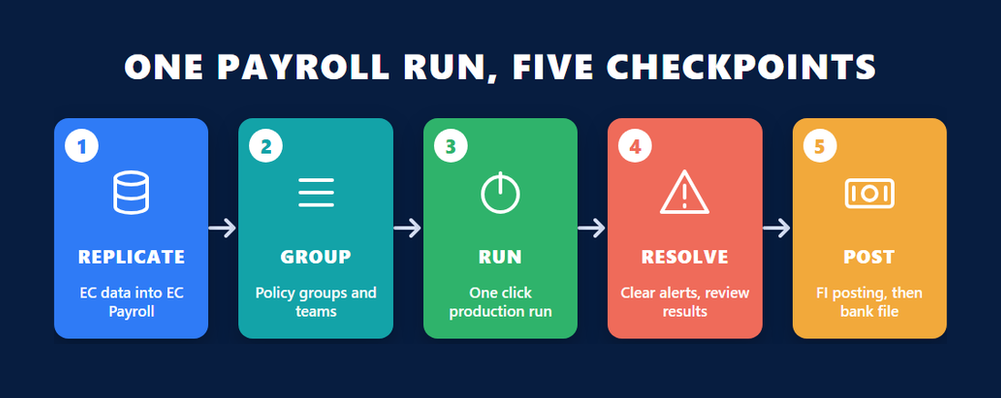
A C_HRHPC payroll run starts before the Payroll Control Center opens. Employee data is replicated from Employee Central into Employee Central Payroll, validated, and grouped into policy groups and teams. A production run is then started with one click, monitored, cleared of alerts and reviewed. Only after that do the subsequent processes begin. The exam scores each handoff, so a wrong early step surfaces as a wrong later result.
Replication is where missing-employee alerts begin
The clearest illustration is in ERPPrep’s free sample material. A new hire has a complete record in Employee Central, yet she is absent from the Payroll Control Center run. The tempting answers all live inside the Payroll Control Center. The correct one lives upstream: verify the employee data replication from Employee Central and run it. The second blueprint area, Employee Payroll Data Management & Replication, exists for exactly this reason. It covers validating what arrived, maintaining the additional payroll data that employee events need, and using infotype mashups to see the payroll side of a record from Employee Central.
SAP’s HRH60 course, Implementing SAP SuccessFactors Integration with Employee Central Payroll, spends its longest unit on configuring Employee Central and its second longest on configuring Employee Central Payroll, with point-to-point replication and the monitoring and troubleshooting tools in between. That is the shape of the first two blueprint areas.
Policy groups, teams and one-click monitoring
Once the data is in, the third area takes over. Policy groups decide which employees a process instance covers, teams decide who watches them, and one-click monitoring starts the production run and shows its progress. ERPPrep’s free sample scenario, a first payroll run for a company it calls Moselle Elevator Works, follows this order through four connected challenges: validate replication, include the right population, resolve the alerts, then sequence posting and bank transfer. If you can finish that scenario without reaching for notes, you understand the backbone of the exam.
Resolving alerts without breaking the run
An alert in the Payroll Control Center is a validation result tied to a specific employee and a specific check. Resolving it means fixing the cause, usually in the data, and letting the check re-run, not suppressing it. ERPPrep’s FAQ lists alert resolution during a run among the hardest topics, alongside configuration and monitoring, because the fix depends on reading the alert correctly rather than on knowing a menu path.
What Does C_HRHPC Expect After the Production Run Ends?
After a production run, C_HRHPC expects the subsequent processes in order: post the results to Financial Accounting, then generate the bank transfer, with an off-cycle run inserted wherever an employee must be paid outside the regular cycle. ERPPrep gives Subsequent Payroll Processes the largest share of its drills, 20 of 120, which is a plain signal of where the scoring sits once the run is complete.
ERPPrep’s sample material includes an off-cycle case in which the steps must be sequenced so that employees are paid and costs are recorded. The order it marks correct is:
- Run the off-cycle payroll process for the affected employees.
- Verify the off-cycle results before anything leaves the system.
- Post the results to Financial Accounting.
- Generate the bank transfer.
Reverse any two of those and something downstream is wrong: a payment with no cost behind it, or a cost with no payment. The fourth blueprint area is about keeping that order under pressure, including when the off-cycle run is the second one that day.
Month-end with no costs in Finance
A second sample case describes a completed, paid payroll with no costs visible in Financial Accounting at month-end. Nothing is wrong with the calculation; the posting process that submits results to Finance simply has not run. It is a reminder that the payroll record, in the plain sense of what each employee was paid and what was withheld, is not finished until it has been handed to the ledger. Employee Central Payroll separates calculation, posting and payment on purpose, and the exam checks that you keep them separate too.
Where Do PCC Configuration, Roles and Authorization Get Tested?
C_HRHPC tests Payroll Control Center configuration through Manage Configuration and the Configuration Workbench, and it tests access through support roles, business roles, PCC authorization and the role-based permissions that Employee Central applies. ERPPrep puts 18 of its 120 drills on authorization and roles and another 15 on configuration, so more than a quarter of its drill set sits inside this one blueprint area.
The weight is no accident. In SAP’s HRH65 course, SAP SuccessFactors Payroll Control Center, the unit on configuring the Payroll Control Center runs to 4 hours 51 minutes of a 12 hour 14 minute course, by far the longest unit, and separate units cover defining roles and defining authorization. SAP’s page lists the course at intermediate level with HR812 as a prerequisite and recommends it for consultant, administrator and support consultant roles.
Two role families, one permission model
A support role decides what a person may do inside the Payroll Control Center: start a process, resolve an alert, reset an instance. A business role decides which employees and which policy groups that person sees. Both sit on top of Employee Central’s role-based permissions, which govern what the person may see of the employee record itself. A scenario that asks why a payroll administrator cannot see a team’s alerts is really asking which of the three layers is missing, and the exam expects you to answer at the right layer.
What Do Auditing, Monitoring and the PCC Tools Add?
The auditing area of C_HRHPC covers payroll audit for control and compliance, continuous monitoring and team monitoring during the cycle, resetting a process instance that has gone wrong, and managing declustered results so payroll data can be read outside the cluster. It is the smallest ERPPrep drill domain, nine of 120, but it is where a consultant proves the run was right rather than merely finished.
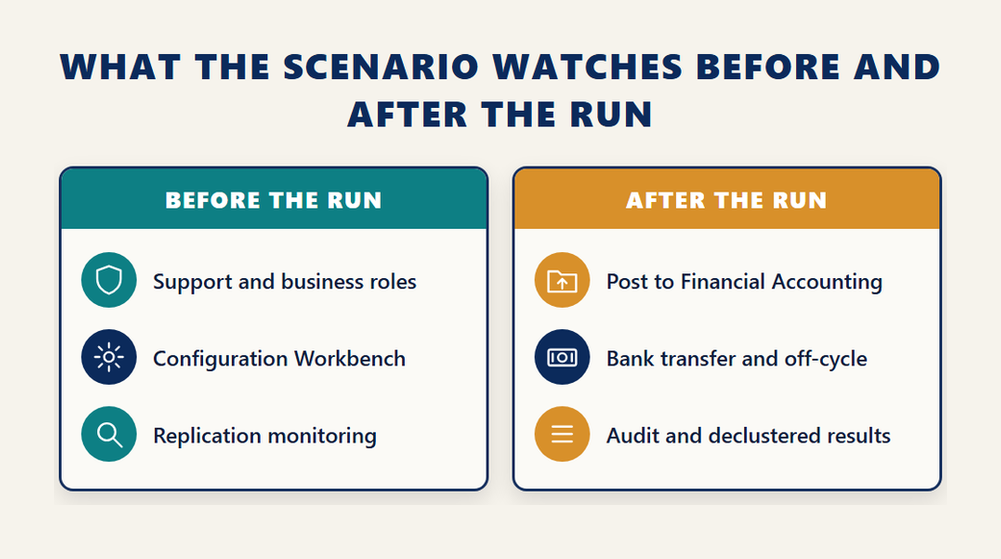
Continuous monitoring is the Payroll Control Center’s answer to a question every payroll manager asks: can I see problems before the run, not after it? Team monitoring narrows the same view to a team’s employees. Resetting a process instance is the escape hatch when a step has been started with the wrong population or the wrong date; the HRH65 course gives it a lesson of its own inside the tools unit. Declustered results take the compressed payroll result out of the cluster and into tables that reporting and audit can read.
SAP has been extending this part of the product. In the SAP SuccessFactors first half 2025 release, SAP’s application product management lead for the suite described an enhanced Payroll Control Center with a flowchart of tasks for the payroll cycle and summed up the aim in one line.
“This improved experience provides real-time insights from pre-payroll activities to post-payroll processing.”
The same first half 2025 release post announced the integration of the position budgeting control workbench with Employee Central Payroll, giving payroll administrators a live view of budget use and costs. Expect the sixth blueprint area to keep growing in that direction: fewer reports run after the fact, more checks visible during the cycle.
What Does the Joule and AI Area Ask of a Payroll Consultant?
The seventh blueprint area, Manage Payroll Activities, Joule & AI Capabilities, covers the Manage Payroll Activities version of the Payroll Control Center together with the newer AI, Joule and HR and payroll assistant capabilities SAP has added around payroll. It is the youngest area in C_HRHPC and the one with the least third-party coverage, so prepare it from SAP’s own release material rather than from older study notes.
Two threads matter. The first is Manage Payroll Activities itself, a newer experience for the payroll administrator that presents the cycle as a sequence of activities rather than as a set of monitoring tiles. Know how it relates to the classic Payroll Control Center screens, because the scenario can describe either. The second is Joule. The first half 2025 release notes that Joule helps employees understand their pay statement, and SAP markets the same capability as Explain Pay: an employee asks why this month’s net pay differs from last month’s and gets an answer drawn from the payroll result, which removes a ticket from the payroll team’s queue.
How this area is likely to appear in a scenario
A scenario is unlikely to ask you to configure an AI model. It is far more likely to describe a payroll operation and ask which capability answers it: an employee question about a deduction, an administrator who wants the cycle as a checklist, a payroll team that wants pre-payroll checks surfaced earlier. Match the situation to the capability, and remember that Joule features depend on Joule being enabled for the SuccessFactors tenant, which is a licensing and setup decision rather than a payroll one.
Which SAP Courses Prepare You for C_HRHPC, and in What Order?
ERPPrep’s recommended path for C_HRHPC runs HR812, then HRH60, then HRH65, the three courses behind SAP’s Configuring SAP SuccessFactors Employee Central Payroll learning journey. SAP’s course pages display HR812 at 4 hours including its assessment, HRH60 at 5 hours 8 minutes and HRH65 at 12 hours 14 minutes, so roughly 21 hours of course time before any hands-on rehearsal. ERPPrep’s FAQ puts the journey at about 24 hours.
- Hold or earn the HCM Payroll credential C_HCMP first, because SAP expects an implementing consultant to carry both.
- Complete HR812, SAP SuccessFactors Employee Central Payroll for Payroll Administrators, to learn the product from the administrator’s side.
- Complete HRH60, Implementing SAP SuccessFactors Integration with Employee Central Payroll, to configure point-to-point replication and its monitoring tools.
- Complete HRH65, SAP SuccessFactors Payroll Control Center, to configure the Payroll Control Center, its roles, its authorization and its subsequent and off-cycle processes.
- Rehearse full scenarios end to end in a system or in scenario simulations, then drill the weakest domain until the sequence is automatic.
- Book the exam only when you can finish a first-run scenario from replication to bank transfer without notes.
Step one is the one candidates most often skip. If your SAP payroll experience is thin, the earlier article on this site about the HCM Payroll for S/4HANA credential explains what that exam checks and why its errors travel into everything downstream, including Employee Central Payroll.
How much time to allow
ERPPrep’s FAQ suggests one to three months alongside a job, with the learning journey as the spine and hands-on time as the muscle. Its own description of the hardest topics, configuration and monitoring, alert resolution during a run, and the subsequent posting and bank transfer steps, is a fair list of where that hands-on time should go. Reading alone is the preparation mistake ERPPrep names first, and in a scenario format it is the costliest.
The HRH60 integration course is the one to revisit if replication alerts keep surprising you, because its units on configuring Employee Central and configuring Employee Central Payroll are where the replication settings actually live.
Is C_HRHPC the Right SuccessFactors Payroll Exam for You?
C_HRHPC is the right exam if your work is the cloud payroll layer: Employee Central integration, the Payroll Control Center and the processes around it. It is the wrong first exam if you have never configured SAP payroll, because SAP expects C_HCMP alongside it. If your role is Employee Central core, position management or time, a different SuccessFactors credential fits your work better.
The decision usually comes down to which system you spend your day in. A consultant maintaining schemas and wage types in an on-premise or private cloud payroll system belongs with C_HCMP, and may never need C_HRHPC. A consultant whose customers run Employee Central as the system of record and Employee Central Payroll as the engine needs both, in that order. A SuccessFactors administrator who runs payroll but does not implement it can take HR812 and its administrator badge without sitting C_HRHPC at all.
If you are comparing against the version you studied for earlier, the older C_HRHPC_2411 study materials page on this site describes the release-suffixed exam that preceded the scenario format. The topics overlap heavily; the way they are scored does not.
SAP’s own certification page lists the roles and skills the credential stands for as Consultant, Payroll Practices, Payroll Policies and Processes, Data Integration, Payroll Systems, Systems Integration and Payroll Processing. If most of those words describe your job, SAP’s C_HRHPC page is where the booking starts, and it is also where SAP will display any change to the format, the cut score or the languages before any third-party page catches up.
Frequently Asked Questions
What is the C_HRHPC certification?
C_HRHPC is the exam code for SAP Certified – Implementation Consultant – SAP SuccessFactors Employee Central Payroll, an associate-level SAP credential. It certifies that a consultant can integrate Employee Central with Employee Central Payroll, run and monitor payroll in the Payroll Control Center, and manage the posting, bank transfer, off-cycle and audit processes around a run.
How is the C_HRHPC exam delivered?
As one Scenario-Based Assessment activity. ERPPrep and SAP both list a single activity and a 60 percent passing score, and SAP displays a 2 hour duration. There is no item count because the exam has no item bank; you work through a realistic payroll situation and are scored on the decisions and sequence you choose.
Do I need C_HCMP before C_HRHPC?
SAP’s certification page states that consultants implementing Employee Central Payroll are required to hold valid credentials for both C_HCMP and C_HRHPC. SAP’s learning journey for the product also recommends being certified in HCM Payroll first. If you intend to implement the product, plan for both.
What languages is C_HRHPC offered in?
It depends on the format you book. SAP’s page shows the roleplay with AI guidance option in English, Spanish, Italian, French and Japanese among other languages, and the recorded video option in English only. ERPPrep lists the languages as not published by SAP, since there is no single language for the exam.
How long is the C_HRHPC exam?
SAP’s certification page displays 2 hr for C_HRHPC. ERPPrep does not publish a duration on its study guide, FAQ or product page, so the SAP page is the source for timing.
Which blueprint areas does C_HRHPC cover?
ERPPrep lists seven: Employee Central Payroll Foundations and EC Integration; Employee Payroll Data Management and Replication; Payroll Processing in the Payroll Control Center; Subsequent and Off-Cycle Payroll Processes; PCC Configuration, Roles and Authorization; Payroll Auditing, Monitoring and PCC Tools; and Manage Payroll Activities, Joule and AI Capabilities. No weightings are published.
Which SAP courses prepare for C_HRHPC?
HR812, HRH60 and HRH65, in that order, which make up SAP’s Configuring SAP SuccessFactors Employee Central Payroll learning journey. SAP displays them at about 4 hours, 5 hours 8 minutes and 12 hours 14 minutes respectively.
How long should I prepare for C_HRHPC?
ERPPrep’s FAQ suggests one to three months alongside a job, built around the roughly 24 hour learning journey plus hands-on time in a system or in scenario simulations. Candidates without prior SAP payroll experience should allow more.
Are older C_HRHPC_2411 or C_HRHPC_2311 figures still valid?
No. Pages quoting 80 items and 180 minutes describe release-suffixed versions that have been replaced. The current exam is one scenario activity at 60 percent; treat older pages as a topic map only.
Conclusion
C_HRHPC is best understood as the second half of a pair. C_HCMP proves you can make SAP payroll calculate; C_HRHPC proves you can run that engine from the cloud: replicate the data, control the run in the Payroll Control Center, clear the alerts, post and pay in the right order, and audit the result. ERPPrep’s seven blueprint areas follow that cycle, SAP displays a 2 hour scenario passed at 60 percent, and the three-course learning journey covers the ground in about a day of course time. Take HR812, HRH60 and HRH65 in order, rehearse a full first-run scenario until the sequence is automatic, and book the exam when a missing employee or a missing posting no longer sends you to the wrong screen.


