In SAP, we can create One Time Customer Master Record for those customers which do not have frequent transactions and we do not want to maintain their master records separately. In such cases we create One Time Customer in which General Information(Name , Address, Phone no etc ) can be maintained at the time of transaction.To Create a One Time Customer Master –
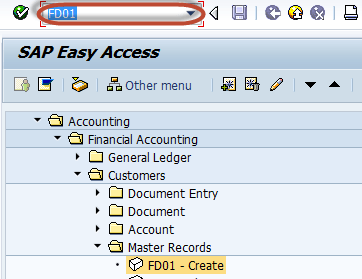
Enter Transaction Code FD01 in SAP Command Field
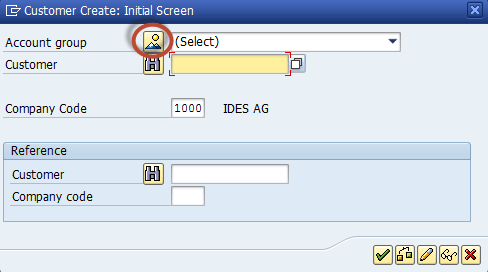
In the next screen , Select Account Group Overview Button
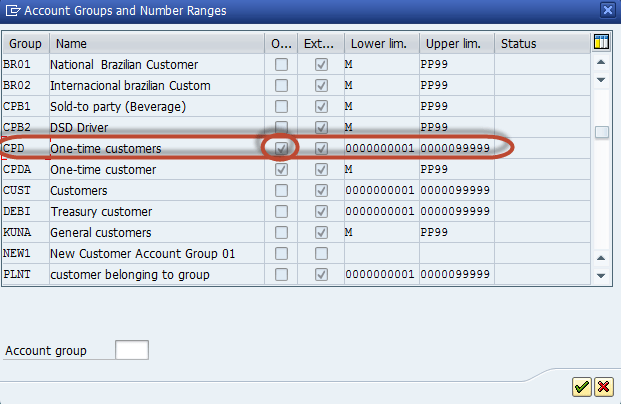
In the next dialog box, Select the Account Group in which One Time Customer Property is Checked.
In the main screen ,Enter the Following
1. Enter the Customer Id as per the Number range Assigned to the Account Group
2. Enter the Company Code in which the master is to be created
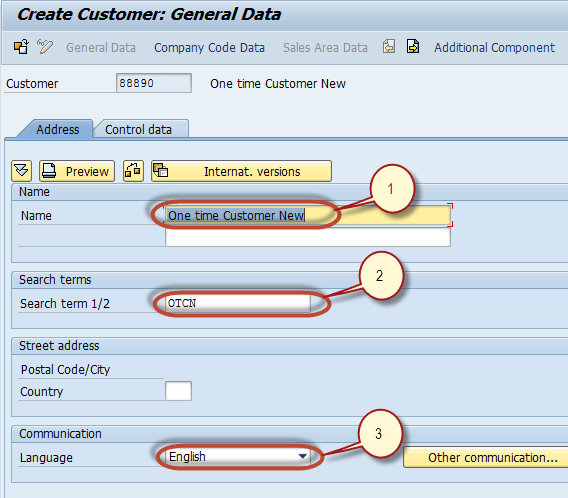
In the next screen in the General data – Address Tab, Enter the Following
1. Enter the name for the One Time Customer Master
2. Enter the Search Term
3. Enter the Communication Language
Select the Company Code Section in the Application Menu

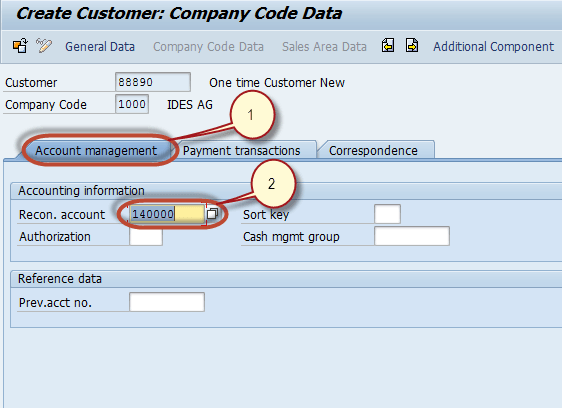
In the next screen in the Company Code Section,
1. Select the Account Management Tab
2. Enter the Reconciliation G/L Account Number
Press ‘Save’ to Create the new One time Customer Master

Check the Status bar for the Creation of the new Customer Master



